TL;DR
- E-commerce product categorization structures your catalog so customers find what they need fast, which directly lifts conversion rates
- A clean taxonomy feeds personalization engines, search algorithms, and recommendation systems that retailers use to drive repeat purchases
- Manual categorization works for small catalogs but breaks at scale; AI-powered systems handle thousands of SKUs with accuracy humans can't match
- The hybrid model combines machine speed with human judgment for categories that carry revenue risk or require domain expertise
- Retailers who get categorization right see 30 percent higher add-to-cart rates and measurably lower bounce from category pages
A customer lands on your site, searches for running shoes, and gets 847 results with no way to filter by terrain type or cushioning level. They scroll for 15 seconds, see nothing that clicks, and leave. You just lost a sale to a structural problem, not a product problem.
That happens when a brand’s e-commerce product categorization breaks down. Retailers with messy catalogs have to watch customers bail because the path from search to checkout has too much friction. The fix is not adding more products. It's organizing what you already have so shoppers can actually find it.
E-commerce product categorization is the system that turns a pile of SKUs into a browsable, searchable, revenue-driving catalog. When it works, customers move from browsing to cart without thinking. When it doesn't, you're paying for traffic that converts poorly.
This guide covers what ecommerce productcategorization actually is, why AI-powered systems beat manual tagging at scale, and how to build a taxonomy that feeds your personalization engine and lifts conversions. If you're managing thousands of products or planning to, the method matters more than the tools.
Let's get into it.
What is E-commerce Product Categorization?
E-commerce product categorization is the process of grouping your product SKUs into logical, hierarchical structures so customers can navigate your store without getting lost.
Think of it as the architecture behind your storefront. Physical retailers put shoes in one aisle and electronics in another. Online stores do the same thing digitally, but the structure can go deeper because there's no physical constraint on shelf space.
A well-built taxonomy starts broad and narrows down. Apparel splits into Men, Women, and Kids. Men splits into Tops, Bottoms, and Outerwear. Tops split into T-Shirts, Button-Downs, and Polos. Each level gives the customer a choice that gets them closer to what they want. The structure mirrors how people think about shopping, not how a warehouse organizes inventory.
Product taxonomy is the rulebook for how those categories are built and maintained. It defines parent-child relationships, naming conventions, and where products with overlapping attributes should live. A product can belong to multiple paths if your taxonomy allows it. A protein bar might sit under both Health and Grocery. That's called polyhierarchy, and it's common when products serve different shopper intents.
The goal is not just organization. It's discoverability. When categories align with how customers search and browse, they find products faster. That speed translates to higher conversions. Retailers who nail this see measurably better performance on category pages compared to stores where navigation feels like a maze. For more on how clean product data supports the entire ecommerce data annotation pipeline, read and learn here, that foundation determines how well your search, filters, and recommendation engines perform downstream.
Pro tip: If your site search keeps surfacing irrelevant results, the root cause is often miscategorized products, not a weak search algorithm. Fix the taxonomy first before tuning search ranking.
Why Product Categorization Matters for Online Sales
Retailers lose revenue to bad categorization every day. A shopper clicks a category expecting one thing and sees a jumbled list of unrelated products. They leave. That exit costs you the sale, but it also tells search engines your page didn't satisfy the query. Over time, poorly organized category pages rank worse, which compounds the traffic problem.
When categorization works, customers move through your site faster. They click into Sneakers, filter by size and brand, add to cart, and check out. The path is clean. Research shows that stores with optimized taxonomies see add-to-cart rates jump by 30 percent compared to sites where navigation requires guesswork. That lift is not from better products. It's from a better structure.
Search engines reward well-organized sites. Category pages with clear hierarchies, keyword-rich descriptions, and logical internal linking rank better than flat catalog dumps. Google can crawl and index your products faster when the taxonomy makes sense. That means more organic traffic landing directly on high-intent category pages instead of your homepage.
Product categorization also feeds your personalization and recommendation engines. When products are tagged accurately, the system can suggest related items that actually make sense. A customer viewing Athletic Apparel sees Workout Gear, not Kitchen Appliances. Those cross-category suggestions drive higher average order values because the recommendations feel relevant, not random.
On the operations side, clean categorization means better inventory tracking. You know which categories move fast, which ones sit stagnant, and where to focus your buying decisions. Category-level reporting gives you visibility into what's working and what's not, which beats looking at SKU-level sales data with no structure around it. For teams managing large catalogs, the right system makes the difference between reactive firefighting and proactive decision-making. Learn more about how automated product tagging keeps catalogs accurate at scale without manual overhead.
Types of E-commerce Product Categorization
Not every catalog needs the same categorization approach. Small stores selling niche products can get by with simple, flat structures. Large retailers managing thousands of SKUs across multiple brands and product lines need deeper hierarchies and more sophisticated tagging. The type of categorization you use depends on inventory size, customer behavior, and how much automation you can support.
Flat vs. Hierarchical Categorization
Flat categorization works when you're selling a narrow range of products. A store with 50 items can list everything under five broad categories and call it done. Customers can scan the whole catalog without getting lost. But that model breaks as soon as inventory grows. A flat structure with 500 products turns into a scrolling nightmare.
Hierarchical categorization builds depth. You start with top-level categories and add subcategories as needed. Electronics splits into Computers, Audio, and Cameras. Computers are split into Laptops, Desktops, and Tablets. The hierarchy can go three to five levels deep, depending on how specific your product attributes get. Most large retailers use hierarchical models because they scale better and support faceted filtering.
Attribute-Based Categorization
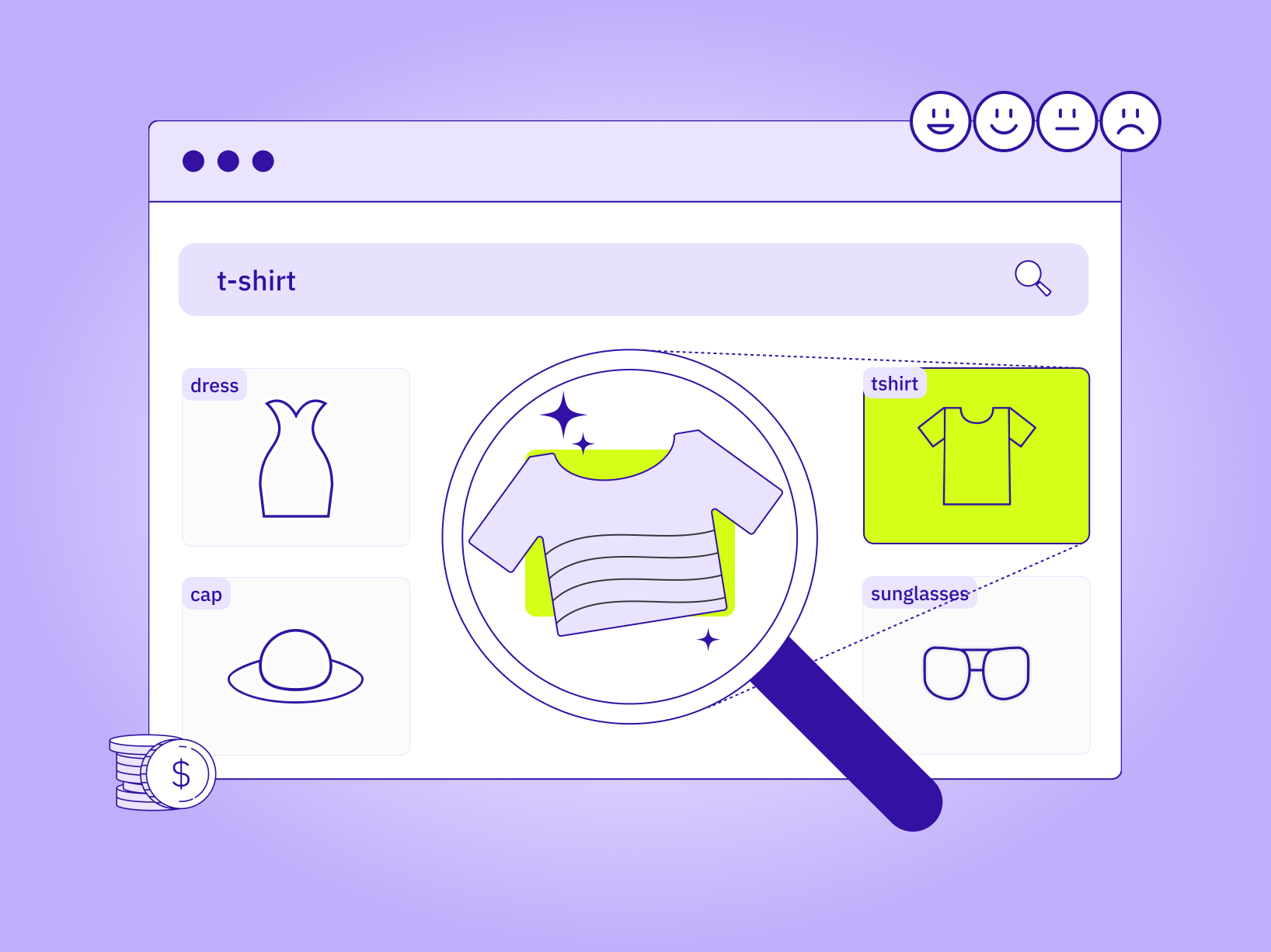
Attribute-based categorization tags products by their features rather than just their type. A dress is not just in the Dresses category. It's tagged as Color: Black, Fit: A-Line, Occasion: Evening, Fabric: Silk. Those attributes power the filters customers use to narrow results. Without them, someone searching for a black evening dress has to manually scan every dress in the catalog.
This approach is common in fashion, home goods, and any vertical where products have multiple defining characteristics. The attribute layer sits on top of the hierarchical structure. It gives customers more control over how they browse and makes the shopping experience feel tailored to their needs. The tradeoff is complexity. Every product needs multiple tags, and those tags need to stay consistent across your catalog. Inconsistent tagging breaks filters and frustrates shoppers.
Behavior-Based and Dynamic Categorization
Behavior-based categorization uses customer data to organize products around what people actually buy together or search for. Instead of static categories, you create dynamic groupings like Frequently Bought Together, Trending Now, or Best Sellers. These categories shift based on real-time behavior, which keeps your storefront feeling fresh and responsive.
This model works best when layered on top of a solid hierarchical taxonomy. The static structure gives customers a predictable way to browse. The dynamic categories surface products that match current demand or seasonal trends. Retailers using behavior-based groupings report double-digit lifts in average order value because the suggestions feel relevant in the moment, not like generic upsells.
Pro tip: Dynamic categories like Trending Now should refresh at least weekly, not monthly. Stale trending lists kill trust faster than no trending list at all.
Key Benefits of Product Categorization for E-commerce
The payoff from good categorization shows up in multiple places. Conversion rates climb because customers spend less time hunting and more time buying. Bounce rates drop because category pages actually match what the customer expected when they clicked. Search rankings improve because well-structured sites give search engines clean signals about what each page covers.
Faster product discovery is the most obvious benefit. When a customer lands on Running Shoes and sees filters for Trail, Road, and Track, they're three clicks from checkout instead of ten. That speed matters. Research shows that every additional step in the path to purchase increases abandonment. Categorization cuts steps by giving customers direct routes to what they want.
Better search relevance is the second-order effect. When products are tagged accurately, your site search can surface results that match intent, not just keywords. A search for wireless earbuds returns actual wireless earbuds, not every product with the word wireless in the description. That relevance keeps customers engaged instead of frustrated.
Categorization also powers cross-sell and upsell engines. When products are grouped logically, the system can suggest related items that make sense. A customer viewing Laptops sees Laptop Bags and Wireless Mice, not random accessories from unrelated categories. Those suggestions feel helpful instead of spammy, which drives higher attachment rates.
On the operations side, clean categories make inventory management easier. You can track which product lines are moving, which ones are stagnant, and where to adjust pricing or promotions. Category-level reporting gives you visibility into performance trends that individual SKU data can't show. For retailers running promotions or seasonal campaigns, that visibility is what lets you move fast without guessing. Discover how data annotation drives retail AI systems that depend on accurate categorization to function.
How to Build an Effective Product Categorization System
Building a categorization system that scales starts with understanding how your customers search and shop. You're not designing for your internal org chart. You're designing for shopper intent. That means analyzing search queries, browsing patterns, and drop-off points to figure out where the current structure fails.
- Start by mapping your catalog to customer language. If customers search for sneakers but your category is called Athletic Footwear, you've already lost them. Use keyword research tools to find out what terms people actually use, not what your product team prefers. Match category names to search volume, and test those names with real users before committing to them.
- Define your hierarchy depth early. Most retailers work with three to five levels. Going deeper than five makes navigation feel like a maze. Going shallower than three means your categories are too broad to be useful. The right depth depends on inventory size and product complexity. A fashion retailer selling 10,000 styles needs more levels than a hardware store selling 300 tools.
- Establish naming conventions and stick to them. If one category uses Brand X Laptops and another uses Laptops by Brand Y, customers have to guess which format to follow. Consistency in naming reduces cognitive load and makes your site feel organized instead of chaotic. Document your conventions and train anyone who touches the catalog on how to apply them.
- Build in attribute tagging from the start. Every product should have the attributes customers use to filter results. Color, size, brand, material, and occasion. The more attributes you tag consistently, the better your filters work. Inconsistent tagging breaks filters and makes your site feel broken, even when the products are there.
- Plan for category-level content. Each category page should have a unique description that includes relevant keywords and explains what the category covers. That content helps with SEO and gives customers context when they land on the page. Don't skip this step. Thin category pages with no content rank poorly and convert worse.
Pro tip: Run a quarterly audit of your top 20 category pages. If any have bounce rates above 60 percent, the structure is failing and needs a redesign.
Manual vs AI-Powered Product Categorization
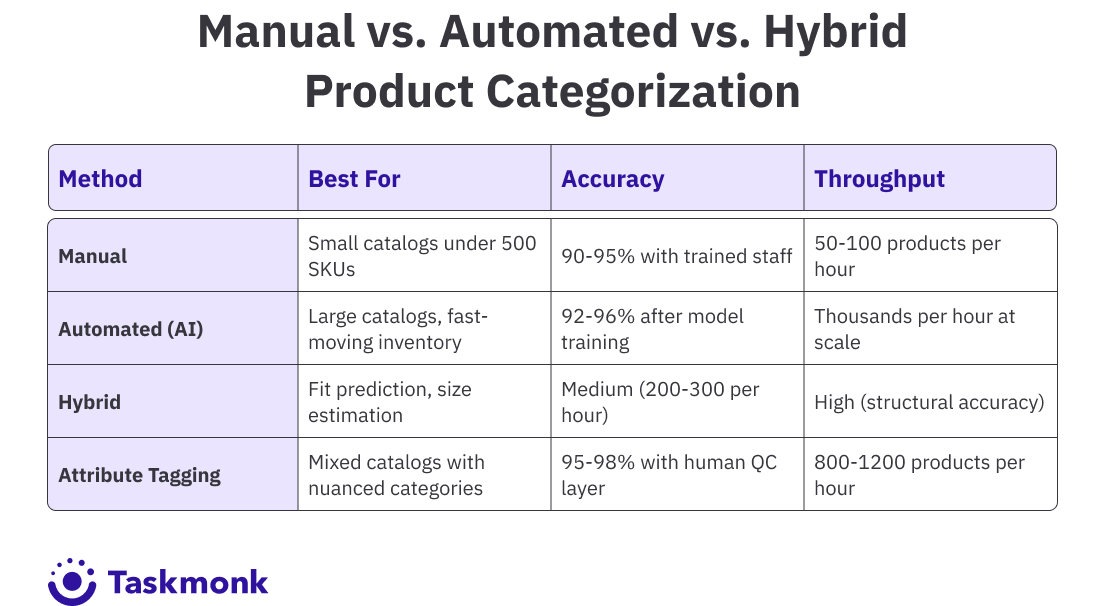
Manual categorization works when you're dealing with a small, stable catalog. A team can tag 500 products accurately in a few days, and the structure stays clean as long as new products trickle in slowly. But that model breaks as soon as inventory scales or product attributes get complex. A catalog with 5,000 SKUs and weekly new arrivals will bury a manual team in backlog.
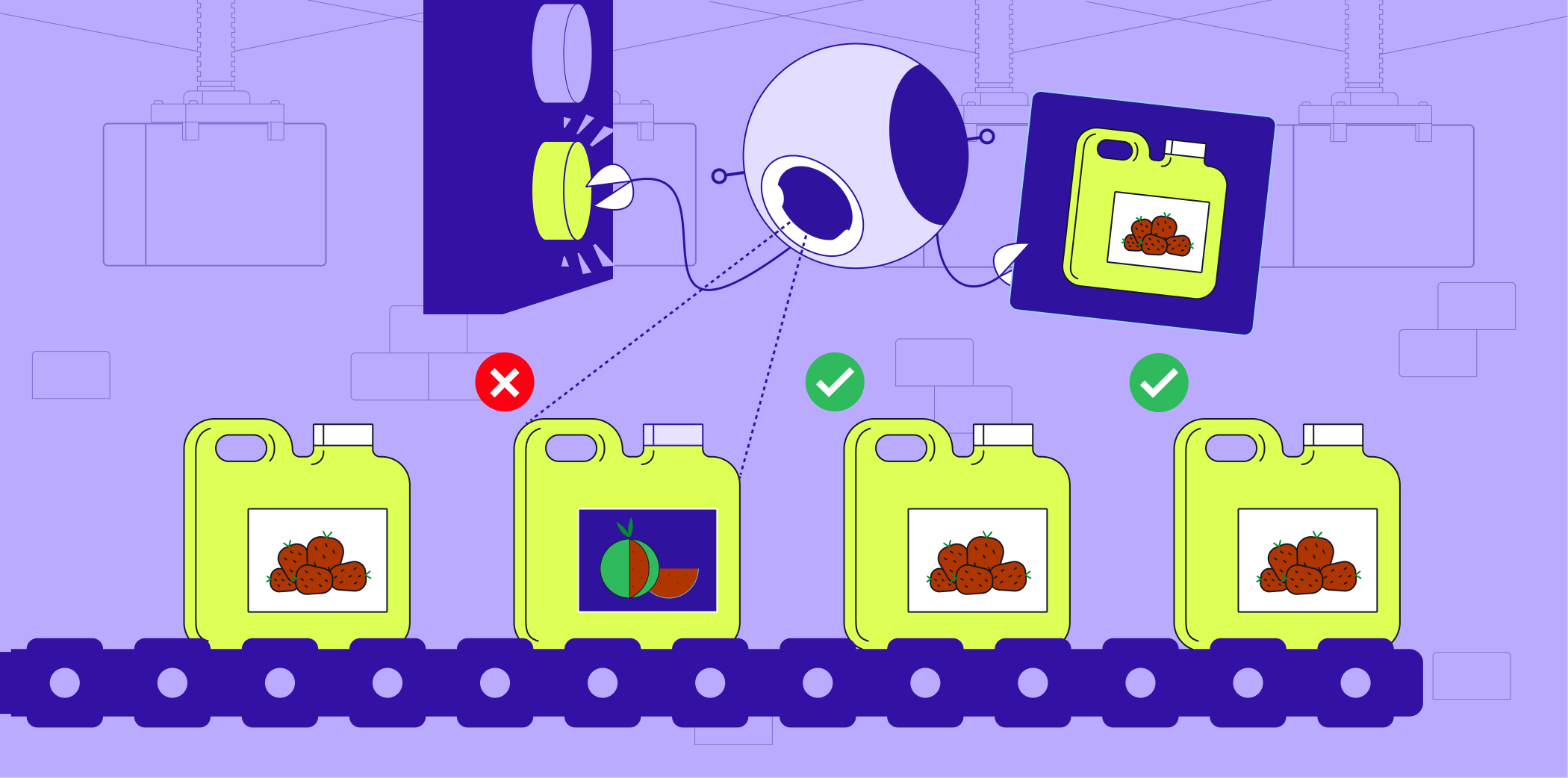
AI-powered categorization uses natural language processing and machine learning to auto-tag products based on titles, descriptions, and images. The system learns from existing labeled data, then applies those patterns to new products at scale. A trained model can process thousands of SKUs per hour with accuracy that matches or beats human performance on straightforward categories.
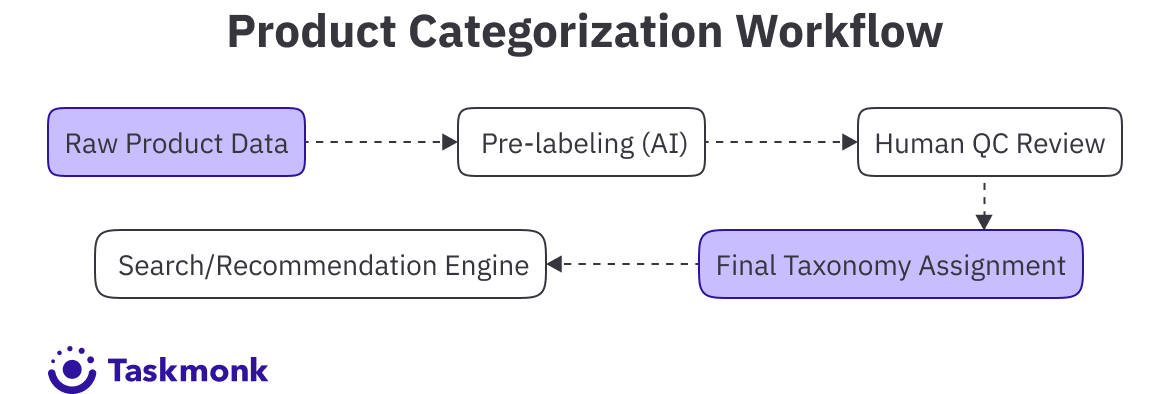
The hybrid model is where most large retailers land. AI handles the bulk categorization, and humans review edge cases or high-value products where mistakes carry revenue risk. A dress that could be tagged as either Cocktail or Evening goes to a human for the final call. The AI speeds up the process, and the human layer keeps accuracy high on categories that matter.
Manual categorization gives you control but caps your throughput. AI gives you speed but requires training data and ongoing tuning. The hybrid approach balances both. For retailers managing large, fast-moving catalogs, the hybrid model is the only way to stay current without overwhelming your team. Companies like top ecommerce annotation providers specialize in building these hybrid workflows at scale, combining AI efficiency with human judgment where it counts.
The Labeled Data Behind AI-Powered Categorization
An AI categorization model is only as good as the examples it learned the category boundaries from. Most teams evaluating "AI-powered" categorization tools skip past this and go straight to comparing accuracy claims, but accuracy claims are downstream of one thing: how the training set was labeled, and by whom.
A model trained on inconsistently categorized historical data inherits that inconsistency. If two products with near-identical attributes ended up in different categories at different points in your catalog's history because two different merchandisers made the call differently, the model learns that inconsistency as if it were a real pattern. This shows up later as categorization drift: the model confidently placing similar products in different categories, and nobody can tell if it's wrong or just following precedent.
How TaskMonk Handles E-commerce Product Categorization
Working across 480 Million tasks across 6 Mn hours for leading global retailers like Flipkart, Myntra & many more, means that we have been through almost every edge case & roadblock for ecommerce catalog management.
Retailers managing thousands of SKUs hit the same problem: Manual categorization takes too long, and pure automation makes mistakes on edge cases. The catalog falls behind, search breaks, and customers stop finding what they need.
This is how we leverage both our platform & services to resolve this:
Pre-labeling from trained models. The system ingests product data and runs it through classification models trained on your taxonomy. The AI assigns initial categories based on titles, descriptions, and image analysis. That pre-labeling step handles 80 to 90 percent of straightforward products instantly, which frees your team to focus on the nuanced cases that need human judgment.
Three QC methods for accuracy at scale. TaskMonk routes flagged products through Maker-Checker, Maker-Editor, or Majority Vote workflows depending on how much validation you need. High-revenue categories or products with ambiguous attributes get human review before they go live. The QC layer keeps error rates below 4 percent even on large batches, which is what you need when miscategorization costs conversions.
Affinity-based annotator routing. Not every annotator understands every category. A fashion product needs someone who knows the difference between cocktail and evening wear. A technical product needs someone who understands specs. TaskMonk's platform matches tasks to annotators based on domain expertise, which lifts accuracy on specialized categories that generic tagging teams get wrong.
It is no wonder then that the platform holds a 4.6 out of 5 rating on G2 and has helped retailers save more than $10M in operational costs by replacing slow manual workflows with hybrid systems that scale. If you're managing a catalog that's growing faster than your team can keep up, the platform is built to handle that gap.
If you want to see how it works on your data, book a demo with the TaskMonk team. They will run your raw product files through the platform so you can see output quality and turnaround time before committing to anything.
Conclusion
Bad categorization is invisible until it costs you sales. A customer searches, scrolls, finds nothing, and leaves. You see the bounce rate climb, but don't know why. The real reason is usually structural. The taxonomy is wrong, the attributes are inconsistent, or the hierarchy is too deep for anyone to navigate. Fixing it lifts conversions without changing a single product.
Retailers who get categorization right build systems that scale with their catalogs. They use AI to handle volume and humans to handle nuance. They audit category performance quarterly and adjust when bounce rates spike. They tag attributes consistently, so filters work and personalization engines have clean data to pull from. The work is not glamorous, but it's what turns a messy catalog into a revenue engine.
If your catalog is growing faster than your team can categorize it, you need a hybrid system that combines machine speed with human judgment. That's the only model that scales without sacrificing accuracy. The retailers winning on conversion are the ones who treated categorization as a core competency, not a backend chore.
Frequently Asked Questions
.png)