A Step-by-Step Guide to Visual Search in E-Commerce
TL;DR
- Image search in e-commerce lets shoppers find products by uploading a photo instead of typing keywords.
- Visual search works by converting images into feature vectors and matching them against an annotated product catalog.
- Building it requires five steps: product image annotation, feature extraction, indexing, query processing, and search result ranking.
- The most common failure point is poor training data. Unlabeled or inconsistently tagged product images break the model before it ships.
- Annotation quality directly determines visual search accuracy; teams with structured labeling see 30-40% better search conversion rates.
- TaskMonk has annotated product catalogs for 10+ Fortune 500 retailers and handles the full e-commerce labeling pipeline: attribute tagging, search relevance, taxonomy mapping, and fashion-specific annotation for visual AI.
Your customer sees a jacket on a friend's Instagram story. No brand tag, no caption. She opens your app, uploads the screenshot, and within two seconds she's looking at twelve similar options from your catalog. She buys one. That's the entire point of image search in e-commerce.
Text search was never built for this moment. It requires the shopper to translate a visual impression into words, and most of the time, they can't. They don't know that the jacket is a 'moto-style biker with asymmetric zip' and they shouldn't have to. Visual search removes that translation step entirely.
But here's what most implementation guides skip over: the search engine is only as good as the data it's trained on. You can wire up the best embedding model in the world and it will still return garbage results if your product catalog isn't annotated with enough precision. Getting visual search right is as much an annotation problem as it is an AI problem. This guide covers both. Here's how it works.
What Image Search Actually Does (And Why Keyword Search Can't Replicate It)
When a shopper uploads a photo to a retail app, something specific happens behind the scenes. A computer vision model analyzes that image by breaking it down into visual features like color, shape, texture, and object boundaries, then converts them into a numerical representation called a feature vector. That vector gets compared against a database of pre-indexed product vectors to surface visually similar items. The whole process happens in under a second.
This is different from keyword search in a way that matters. Keyword search depends on the accuracy of product metadata: if your catalog says 'navy blazer' but the shopper searches for 'dark blue suit jacket,' she'll get a zero-result page or a poor match. Visual search bypasses this. The query is the image itself, and the match is visual: color, silhouette, fabric texture, hardware details.
AI image search uses three core technologies. Computer vision identifies objects and attributes within the query image. Deep learning embeddings convert those visual features into vectors that can be compared mathematically. Nearest-neighbor search algorithms then scan the indexed catalog and return ranked results fast enough for a real-time shopping experience.
Visual search in retail has moved from experimental to expected fast. Google Lens processes around 20 billion visual searches monthly, with 4 billion related to shopping. Amazon reported a 70% year-over-year increase in visual searches globally (Imagga, 2026). ASOS users who engaged with its Style Match feature were 75% more likely to return to the site. The infrastructure behind all of this starts with one thing: a well-annotated product catalog.
Why Visual Search Has Become a Revenue Problem, Not Just a UX Feature
The problem with keyword search isn't that it's bad at search. It's that it assumes shoppers know how to describe what they want. For apparel, home decor, and accessories, that assumption breaks down constantly. A shopper can tell you she wants something that looks 'kind of like that lamp from the hotel lobby,' but she can't tell you 'brushed brass arc floor lamp with linen drum shade.' The gap between visual inspiration and textual description is exactly where shopping intent gets lost.
Social commerce has made this worse. More product discovery now happens on Instagram, TikTok, and Pinterest than on Google Shopping. Shoppers see something they want in a Reel, save a screenshot, and then have no way to bridge from that screenshot to a purchase in your store. Not unless you give them a visual search entry point. That gap is a direct revenue leak, and most e-commerce teams are still not plugging it.
The numbers are specific. A 2024 Salesfire study found that visual search drives 6.4% of e-commerce revenue. 62% of Gen Z and millennial consumers said they want visual search on retail sites (ViSenze, 2023). Retailers with image-based shopping see higher average order values because visual search surfaces options across price points. ASOS users who discovered products through visual search bought 48% more items per session than those who used text search.
Pro tip: Visual search isn't just a discovery tool. It's a catalog completeness test. If your model keeps returning poor matches for a category, that category is under-annotated. Use search failure rates as a quality signal to find annotation gaps before they hit conversion.
There's also an operational argument that most teams miss. Search relevance data tells you which queries your catalog can't satisfy, and that's a merchandising signal, not just a UX problem. Teams that instrument image-based shopping data can see exactly where shopper intent doesn't match their assortment, which feeds back into buying and catalog decisions.
Steps to Build Image Search for E-Commerce
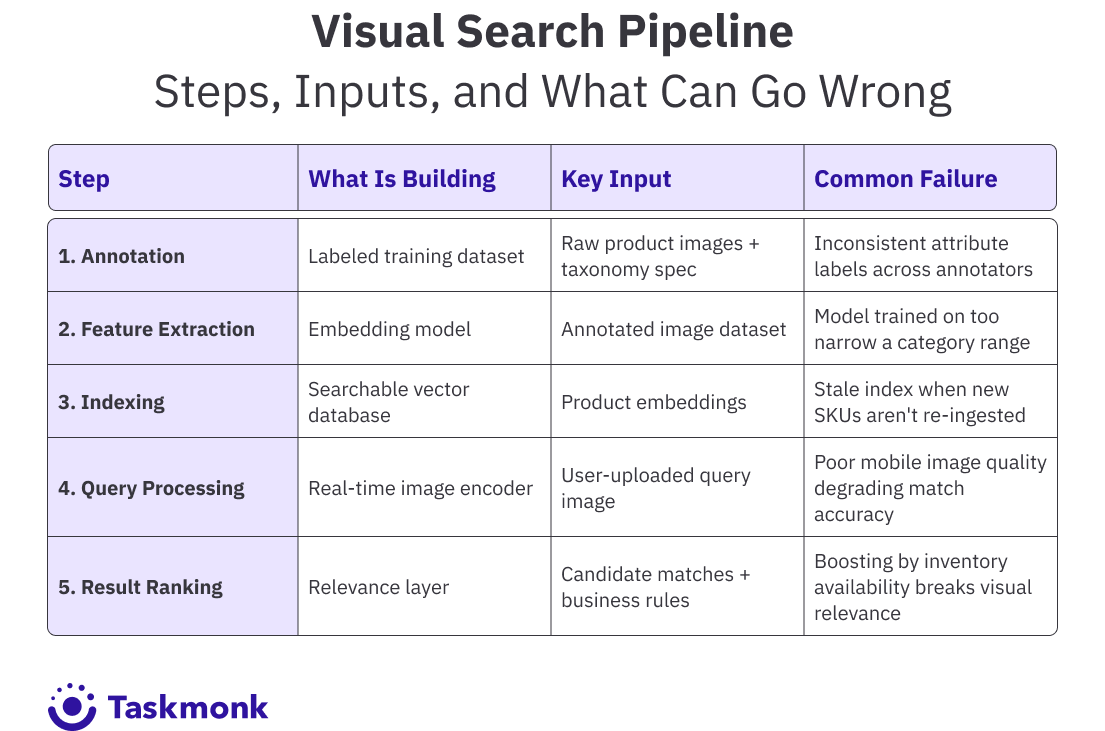
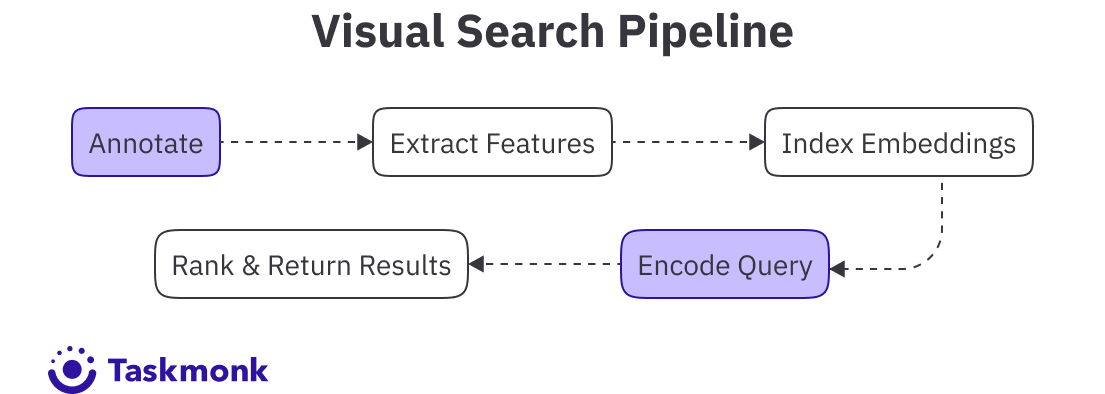
Building an image search pipeline for e-commerce isn't one project. It's five connected problems, each of which depends on the previous one being solved correctly. Miss a step early and the errors compound downstream.
Step 1: Annotate Your Product Catalog
This is where most visual search implementations quietly fail. The model can only surface products it understands, and 'understanding' means having seen labeled examples during training. If your catalog images aren't annotated with specific attributes: product category, color, material, sleeve length, pattern, style, the model has nothing to learn from.
For fashion, this means drawing bounding boxes around individual garments in lifestyle shots, tagging attributes like 'asymmetric hem,' 'ribbed knit,' or 'wide leg fit,' and handling edge cases like occluded products or multi-product shots. For home decor, it means labeling materials, color variants, and style categories. The taxonomy needs to match the way your shoppers think about products, not just how your merchandising team categorized them.
Step 2: Train or Fine-Tune Your Embedding Model
An embedding model converts a product image into a feature vector: a list of numbers that represents the visual content of that image in a form the computer can compare. Pre-trained models like CLIP or ResNet give you a starting point, but they weren't trained on your specific product catalog. Fine-tuning on your annotated data makes a significant difference in match quality, especially for niche categories like eyewear, footwear, or upholstery fabrics.
The quality of your annotation dataset determines how well the fine-tuned model performs. Consistent labels, complete category coverage, and a representative spread of visual variation across lighting, backgrounds, angles, and models all affect the model's ability to generalize to query images uploaded by real shoppers.
Pro tip: When fine-tuning an embedding model, include hard negatives in your training data: pairs of similar-looking products that are actually different categories. Without them, the model tends to match based on background or lighting conditions rather than the product itself.
Step 3: Build and Maintain Your Search Index
Once your model generates embeddings, you need a fast way to find the closest matches across a catalog that might contain hundreds of thousands of SKUs. Vector databases like Faiss, Pinecone, or Weaviate handle approximate nearest-neighbor search at the speed retail requires.
The index needs to update whenever your catalog changes. New SKUs need to be encoded and ingested. Retired products need to be removed. If your index goes stale, shoppers will see irrelevant results for items you no longer carry, and new arrivals disappear from search entirely. This is an ops problem, not just an ML problem. It's often underscoped at the planning stage.
Step 4: Build the Query Processing Layer
When a shopper uploads an image, you need to run the same embedding model on that query image and return a vector that can be compared against your index. The challenge is that query images are messy: screenshots cropped at odd angles, photos taken in poor lighting, images with multiple products or cluttered backgrounds.
Most teams handle this with a pre-processing step that crops and normalizes the query image before encoding. Some implementations let shoppers draw a bounding box around the item they're interested in, which significantly improves match accuracy. The
Step 5: Rank and Tune Your Search Results
Raw nearest-neighbor search returns the most visually similar products, but that's not always what the shopper wants. You'll want to layer in business logic: boost in-stock items, filter by available sizes, surface items within a price range the shopper has shown preference for, or nudge higher-margin products when visual similarity is close.
The key is not to let business rules override visual relevance completely. Shoppers using image-based shopping have a specific visual intent. If you surface a completely different style just because it's on sale, they'll lose trust in the feature quickly. Search relevance and commercial logic need to be balanced.
Common Mistakes That Kill Visual Search Before It Reaches Shoppers
The most expensive mistake teams make is treating image search as a pure ML problem and underfunding the data layer. A well-annotated catalog of 100,000 products will outperform a state-of-the-art model trained on poorly labeled data every time. Annotation quality sets the ceiling on what the model can achieve. Full stop.
The second most common mistake is launching with a static index. New products arrive weekly. Seasonal catalog swaps happen overnight. If the engineering team treats index maintenance as a one-time setup rather than an ongoing pipeline, search quality degrades in direct proportion to how fast the catalog changes.
A few patterns the TaskMonk team has noticed across hundreds of e-commerce image annotation projects, separating teams doing this well from teams doing it poorly:
- Build your annotation taxonomy before you start labeling, not after. Retrofitting labels to a taxonomy that changes mid-project forces rework at scale.
- Use inter-annotator agreement metrics from day one. If two annotators disagree on whether a garment is 'cream' versus 'off-white,' the model will learn both and introduce noise. Set the threshold before the first batch ships.
- Run regular visual search audits against your top search queries. If 'floral summer dress' returns mostly striped or solid results, the problem is in your attribute labels, not your embedding model.
- Don't skip mobile testing. Query images taken on phones have lower quality, more background noise, and more variation than your controlled studio shots. Your pipeline needs to handle that gracefully.
Key Benefits of Visual Search for E-Commerce Brands
The business case for image search in e-commerce has moved past 'nice feature to have.' Teams that have shipped it report concrete outcomes across three areas: discovery, conversion, and retention.
On discovery, visual search surfaces products that text search can't reach. Items with thin keyword coverage: unique one-off pieces, private-label products with no brand search volume, new arrivals without search history. These all become findable the moment a shopper has a reference image. Retailers using annotation-powered visual AI report 30 to 40% improvement in visual search conversion for these hard-to-find categories.
On conversion, visual search closes the intent gap fast. A shopper who uploads an image knows exactly what she wants. She's not browsing. She's buying, or she's very close to it. That intent signal is stronger than any keyword query, and it shows up in both conversion rate and return rate data. Teams using structured product attribute labeling report up to 25% reduction in return rates, because customers are finding products that actually match what they intended to buy.
On retention, visual search users show higher return visit rates. The ASOS data point is worth repeating: users who engaged with visual search were 75% more likely to come back to the platform. That's not coincidence. It's the result of an experience that actually works, one that finds what the shopper wanted without making her describe it in words she doesn't have.
There's also a catalog utilization benefit that's easy to overlook. Text search surfaces the same top-sellers repeatedly because they carry the most search traffic data. Visual search distributes discovery more evenly across the catalog. Products that would never rank on page one of a keyword search become discoverable through visual similarity to whatever a shopper uploaded. That improves catalog turnover and reduces revenue concentration from over-dependence on a handful of top SKUs.
How TaskMonk Handles Visual Search Data Annotation for E-Commerce
When a visual search system returns poor results, the instinct is to blame the model: retrain it or swap the architecture. But the problem is almost always upstream like the annotation spec was too loose or different annotators applied the same attribute label to different things or the taxonomy was built around how the buying team thinks about product, not how a computer vision model needs to see it. By the time those errors surface in search quality metrics, they've been baked into the model for months.
TaskMonk works on the data side of that problem. Over 7 years of e-commerce ai training data projects across fashion, grocery, electronics, and marketplace verticals, with more than 480 million tasks, 6 million-plus labeling hours, and 10-plus Fortune 500 clients, the team & the platform are both battle-tested on most usecases & still learning more every day.
Most of what the team has learned is about failure modes. The annotation workflows TaskMonk runs today are the product of seeing what breaks at scalewith a catalog of millions of products: what happens when a taxonomy is finalized before the edge cases are mapped, what inter-annotator variance looks like when it compounds across 50,000 SKUs, and what it costs to retrofit labels after a model has already shipped.
The managed delivery model matters here. Most annotation platforms give you tooling and a workforce marketplace. TaskMonk scopes the task, defines labeling guidelines, sets up QA workflows, and owns delivery against weekly SLAs. For e-commerce teams who need product category mapping, attribute tagging, catalog enrichment, and search relevance labeling running in parallel, having one point of contact and in-platform dashboards for progress is operationally different from managing annotators yourself. The
Fashion is where the annotation depth shows most clearly. Telling a 'scoop neck' from a 'V-neck' in a cropped lifestyle shot, flagging a garment as occluded when a model's arm covers the sleeve, handling multi-product shots where three items need separate bounding boxes. These are judgment calls that generic annotation teams get wrong consistently. TaskMonk's fashion annotators are trained specifically for these tasks.
The Search relevance labeling is also a separate layer that most teams underinvest in. Annotating product images trains the model on what things look like. Search relevance labeling trains it on whether a result actually satisfies a query. That's a different judgment. TaskMonk handles both: tagging query-result pairs, mapping synonyms and adjectives, grading result quality to eliminate zero-result queries, and labeling across languages for multi-market catalogs. Without this layer, a visual search system can return images that are visually similar but commercially wrong. A floral midi dress when the query was a floral maxi, or a pale grey when the shopper clearly meant charcoal.
Quality control is enforced through three review methods: Maker-Checker, Maker-Editor, and Majority Vote, plus golden tasks and sampling-based validation. The platform surfaces inter-annotator agreement metrics so taxonomy disagreements get caught before they compound. G2 reviewers in e-commerce call out the QC layer consistently, specifically that it doesn't create the bottlenecks that slow other annotation pipelines down. That's the operational tradeoff that matters: quality without the throughput penalty.
If you're starting a visual search build and want to pressure-test your annotation spec before committing to a full pipeline, book a scoping call with the TaskMonk team. Share a sample dataset and your labeling goals, and they'll return labeled samples with a QA report within 24-48 hours so you can evaluate quality against your own benchmark before any significant investment.
Conclusion
The retailers losing ground in visual product search aren't losing because they chose the wrong model or the wrong vector database. They're losing because they shipped a search feature on top of a catalog that wasn't ready for it: inconsistent attribute labels, missing edge cases, taxonomy that made sense to the buying team but not to a computer vision model. The result is a feature that works well for simple queries and badly for the searches that actually matter.
Teams that get this right treat annotation as an ongoing investment, not a setup cost. They update labels when the catalog changes, audit search performance by category, and loop failures back into labeling improvements. The pipeline is never done because the catalog is never done.
Visual search is ultimately a bet on the idea that showing is easier than telling. For your shoppers, that's always been true. The question is whether your product data is good enough to honor that expectation.
Frequently Asked Questions
How does image search work in e-commerce?
A shopper uploads or captures a photo, and the visual search system converts that image into a feature vector using a computer vision model. That vector is compared against a pre-indexed database of product embeddings to find the closest visual matches. The process runs in real time, typically under a second, and returns ranked results based on visual similarity, sometimes adjusted by availability and relevance signals. The accuracy of those results depends almost entirely on how well your product catalog images were annotated during model training.
What's the difference between image search and visual search?
Image search typically refers to finding images using text metadata: you type 'red dress' and get images tagged with those words. Visual search uses the image itself as the query. You upload a photo and the system finds visually similar products by analyzing the image's content. In retail, the two terms are often used interchangeably, but the distinction matters when building a pipeline. Visual product search is about matching visual features, not matching keywords to metadata.
What technology is used to power visual search?
Three technologies work together. Computer vision extracts features from images: shapes, colors, textures, object boundaries. Deep learning models, often convolutional neural networks or transformer-based models like CLIP, convert those features into dense embedding vectors. Vector similarity search using tools like Faiss, Pinecone, or Weaviate finds the nearest matches in the product catalog index fast enough for real-time use. The model usually needs fine-tuning on domain-specific annotated data to perform well on a specific product category.
Why is product image annotation important for visual search?
Annotation is the training data that teaches the model what your products look like. Without it, the model has no way to learn the difference between a 'wrap midi dress' and an 'A-line mini dress,' or between 'slate grey' and 'charcoal.' Inconsistent or incomplete annotation is the single most common reason visual search returns poor results. Not the model itself. Teams that invest in precise, category-specific annotation consistently outperform those that treat it as a checkbox step, often seeing 30-40% better search conversion on annotated categories.
How do I improve the accuracy of image-based shopping on my platform?
Start with an audit of your current annotation coverage by category. Look at which search categories return the weakest visual matches and trace those failures back to the training data. Usually you'll find missing attributes, inconsistent labels, or too few annotated examples for edge cases like occluded products, off-angle shots, or unusual colorways. Fixing the data layer almost always does more for accuracy than retraining the model. From there, run regular search quality audits against your top visual query patterns and feed failures back into labeling improvements.